

10 Signs Your Business Has Outgrown Off-the-Shelf Software
Your business is growing, but is your software keeping up?
As operations expand, your team may spend more time managing spreadsheets, transferring data between systems and finding workarounds than actually getting work done. What once seemed like a simple software limitation can gradually become a daily operational challenge.
Off-the-shelf software offers a convenient starting point for businesses. However, as workflows become more complex and requirements evolve, standard solutions may struggle to support the way your business operates.
Knowing when to build custom software helps you identify these limitations and decide whether a tailored solution is worth the investment.
Off-the-Shelf vs Custom Software: A Quick Refresher
Off-the-shelf software is ready-made for a broad range of businesses. It is generally quick to implement and offers standard features for common business needs.
Custom software is developed around your specific workflows, requirements and operational challenges. It gives you greater flexibility to build features that support how your business actually works.
Neither option is automatically better. The right choice depends on your business maturity, operational complexity and long-term requirements.
For a detailed breakdown of investment, ownership and return on investment, read our guide to custom software vs SaaS cost.
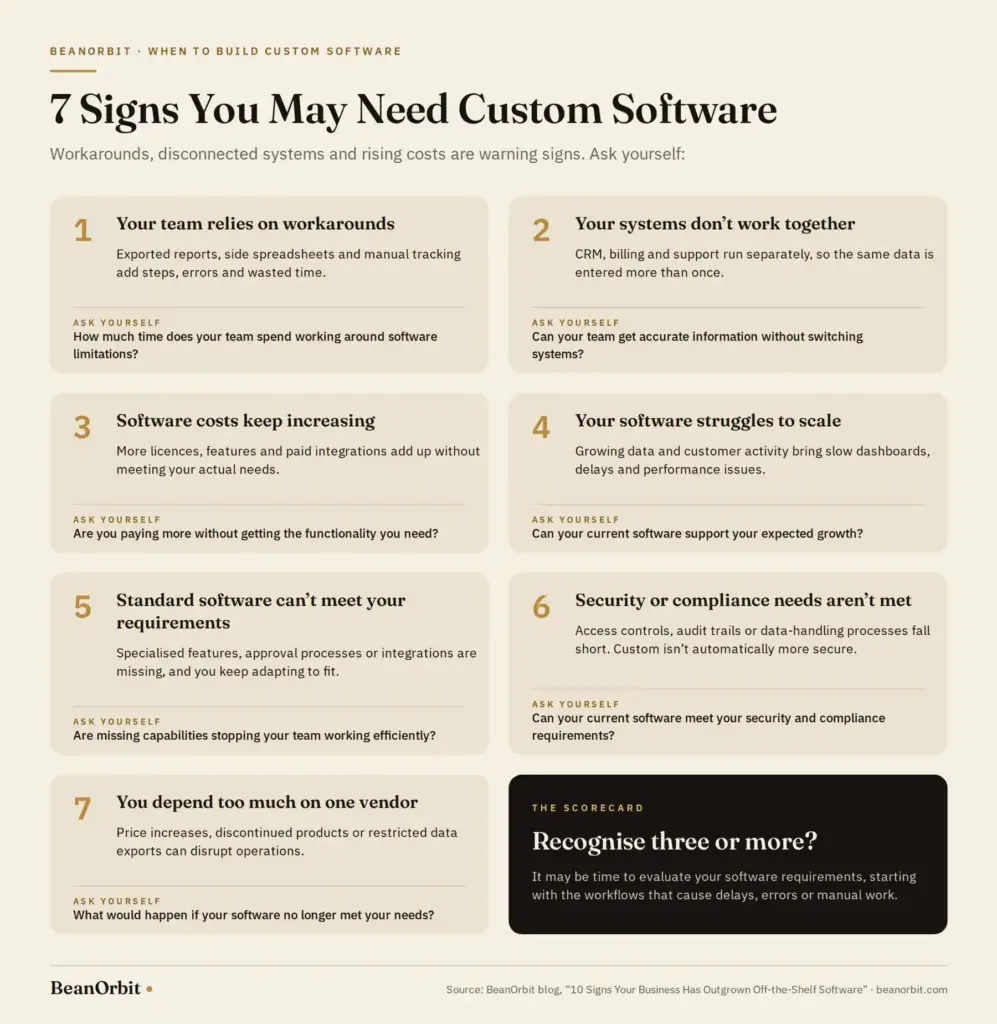
When to Build Custom Software: 7 Signs to Watch
1. Your Team Relies on Workarounds
If your employees regularly export reports, maintain separate spreadsheets or manually track tasks, your software may not support your actual workflow. These workarounds introduce extra steps, increase the risk of errors and consume valuable time.
Ask yourself: How much time does your team spend working around software limitations?
2. Your Systems Don’t Work Together
Your CRM, billing and support systems may operate separately, forcing employees to enter the same information across multiple platforms. This can lead to inconsistent records, reporting errors and delays.
Suitable integrations may solve the problem without requiring entirely new software. However, if existing tools cannot support your operational needs, custom development may be worth considering.
Ask yourself: Can your team access accurate information without switching between multiple systems?
3. Software Costs Keep Increasing
As your business grows, you may need more user licences, additional features and paid integrations. These expenses can add up without addressing your actual requirements.
Compare your current software expenses with the total cost of custom development, including implementation, maintenance and future updates.
Ask yourself: Are you paying more without getting the functionality your business needs?
4. Your Software Struggles to Scale
Increasing data volumes and customer activity can cause slow dashboards, delays and performance issues. Your existing system may need optimisation, but persistent limitations could indicate the need for a different solution.
Ask yourself: Can your current software support your expected business growth?
5. Standard Software Cannot Meet Your Business Requirements
Your team may need specialised features, approval processes or integrations that standard software does not offer. Repeatedly adapting your workflows to fit these limitations can affect efficiency.
Custom software allows you to prioritise features and workflows based on your specific business requirements.
Ask yourself: Are missing capabilities preventing your team from working efficiently?
6. Your Security or Compliance Requirements Are Not Met
Your business may require specific access controls, audit trails or data-handling processes. If your existing software cannot meet these requirements, you may need to evaluate alternatives.
Custom software can be designed around defined security requirements, but it is not inherently more secure than SaaS. Security depends on implementation, testing, access controls and ongoing maintenance.
Ask yourself: Can your current software meet your security and compliance requirements?
7. You Depend Too Much on One Software Vendor
Price increases, discontinued products, restricted data exports or changes to vendor support can disrupt operations when your business relies heavily on one platform.
Review your data access, migration options and alternative solutions before deciding whether to replace the system.
Custom software may offer greater control over specific business functions, but it also requires ongoing maintenance and technical support.
Ask yourself: What would happen if your current software no longer met your business needs?
When to Build Custom Software vs Improve Existing Tools
Recognising these signs does not automatically mean you need custom software. The right decision depends on the problem’s severity, available alternatives and long-term costs.
| Business situation | Recommended next steps |
| Minor workflow inefficiencies | Optimize existing tools and automate repetitive tasks. |
| Disconnected applications | Evaluate integration options and APIs. |
| Missing-business critical features | Compare custom development with available alternatives.
|
| Persistent performance or compliance gap | Assess upgrades, replacement options and custom development. |
Use this comparison as a starting point, not a fixed rule. A single critical security or compliance gap may require immediate attention.
For a detailed cost comparison, read our guide to custom software vs SaaS costs.
When NOT to Build Custom Software
Custom development isn’t necessary for every business. For standard needs like email, basic HR or payroll, off-the-shelf software may be more practical.
When evaluating build vs buy software, consider whether custom development adds real value or creates unnecessary costs, maintenance and complexity.
When comparing your options, consider the initial investment, ongoing maintenance, integration costs, flexibility and total cost of ownership. Choose custom development only when its business value justifies the additional responsibility.
What a Smart Move to Custom Software Looks Like
Recognizing the signs you need custom software is the first step. Instead of replacing every existing system, start by identifying your biggest operational bottleneck.
- Audit: Review your existing tools, workflows and recurring challenges.
- Prototype: Define requirements and develop a prototype to test your solution.
- Pilot: Test with a small team and gather feedback before expanding.
- Migrate: Move data and workflows gradually while retaining tools that still work well.
For businesses across Kerala, this phased approach can help validate requirements and reduce disruption before making a larger investment.
H2: Conclusion
If your business recognizes three or more warning signs, it may be time to evaluate your software requirements. Identify workflows that cause delays, errors or unnecessary manual work.
Understanding when to build custom software helps you decide whether better integrations, automation, or a personalized solution can improve your operations.
BeanOrbit is a custom software development company serving businesses across Kerala and India.
Book a software modernization consultation with BeanOrbit to identify operational challenges and explore the right software development approach for your business.
Frequently Asked Questions
● How do I know when to build custom software?
Consider custom software when you recognize several operational problems such as repetitive manual work, disconnected systems, workflow limitations or difficulty scaling. Start by evaluating whether configuration or integration can solve these issues before committing to development.
● Is custom software always more expensive than off-the-shelf?
Custom software generally requires a higher initial investment. However, subscription expenses, integrations, operational inefficiencies and future requirements also affect the overall cost. The right choice depends on your specific business needs and long-term ownership requirements.
● How long does custom software development take?
An MVP may take approximately 3-6 months, depending on its scope, complexity, integrations and team requirements. A phased rollout can help businesses introduce essential functionality first and expand the solution based on feedback.
● Can custom software integrate with the tools I already use?
Yes. Custom software can integrate with existing CRMs, ERPs, analytics platforms, and other business applications through APIs and supported integration methods. The feasibility depends on the capabilities and access provided by your existing systems.

Ajay Mon K S is the Founder & CEO of BeanOrbit International LLP, an AI-driven software company. With over seven years of experience, he leads the company's vision and business growth.
