

DevOps in the AI Era: What’s Changing and What You Should Do About It
It is 2 a.m. A production alert appears, and an engineer searches through thousands of log lines to identify the cause. Now, imagine AI detecting unusual behaviour, identifying a possible cause and suggesting a fix before the issue escalates.
This is where DevOps in the AI era is making a difference. By combining established DevOps practices with artificial intelligence (AI) and machine learning, engineering teams can improve visibility, automate repetitive tasks and respond to operational issues more efficiently.
However, adopting AI does not mean replacing existing tools or handing over every decision to an algorithm. The real opportunity lies in applying AI where it delivers measurable value while maintaining control over software quality, security and deployment.
In this guide, we explore how AI in DevOps works, the tools businesses can consider, the challenges they need to address and practical steps for successful adoption.
What Does DevOps in the AI Era Actually Mean?
DevOps brings software development and IT operations together to improve collaboration, delivery speed and reliability. It relies on practices such as continuous integration and continuous delivery (CI/CD), infrastructure as code (IaC), automated testing and continuous monitoring.
DevOps in the AI era builds on these practices by using AI to analyse data, detect patterns, support decisions and automate selected tasks.
For example, AI-powered monitoring tools can detect unusual application behaviour and suggest possible causes. Code assistants can review pull requests and flag potential defects before deployment.
Depending on the tool, AI can provide recommendations or trigger predefined actions. However, reliable infrastructure, quality data, thorough testing and clear processes remain essential for effective AI adoption.
DevOps vs AIOps vs MLOps
Although these terms are related, they address different engineering needs.
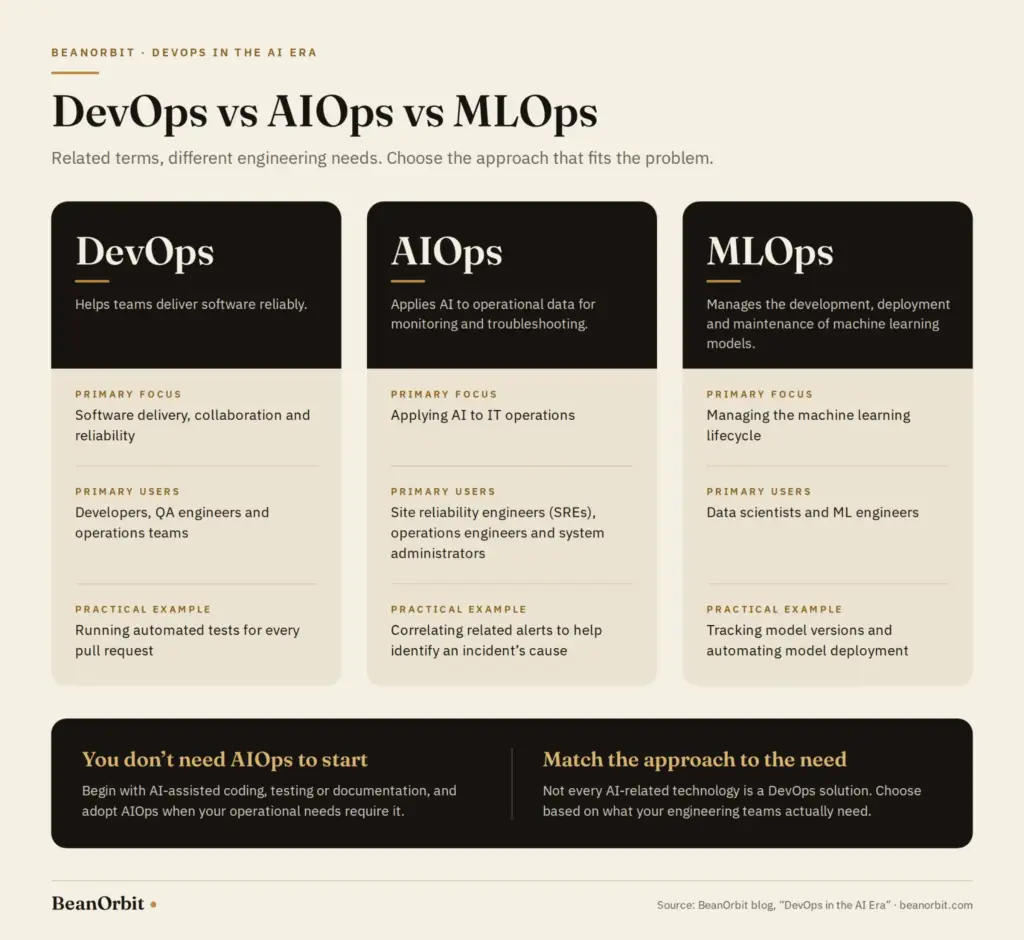
DevOps helps teams to deliver software reliably. AIOps applies AI to operational data for monitoring and troubleshooting, while MLOps manages the development, deployment and maintenance of machine learning models.
Understanding MLOps vs DevOps helps businesses to choose the right approach based on their engineering needs, rather than treating every AI-related technology as a DevOps solution.
5 Ways AI Is Changing DevOps
AI is influencing several stages of the software delivery lifecycle, from writing and testing code to monitoring production systems.
1. Smarter CI/CD Pipelines
Traditional CI/CD pipelines automate software builds, testing and deployment. However, large test suites and inefficient workflows can slow delivery.
AI-powered CI/CD analyses code changes, previous test results and pipeline behaviour to prioritise tests, identify potential failures and suggest pipeline improvements. This can speed up feedback and reduce debugging time.
For example, an AI-assisted testing system may prioritise tests related to a code change and its dependencies.
However, essential regression, security and integration tests should never be skipped solely because an AI model predicts they are unlikely to fail.
2. Faster Code Review and Testing
AI coding assistants can review pull requests, flag potential defects, suggest code improvements and generate initial unit tests.
For example, GitHub Copilot code review can highlight potential issues and suggest changes. These capabilities help developers identify problems earlier and focus on complex tasks. Read the official GitHub Copilot code review documentation for more details.
AI can also help identify missing test cases and assist with debugging. However, AI-generated code still requires human review and automated testing to ensure quality and security.
https://docs.github.com/en/copilot/concepts/agents/code-review
3. Predictive Monitoring and Incident Response
Traditional monitoring relies heavily on predefined thresholds, which can generate unnecessary alerts as workloads change.
AI-powered observability tools analyse logs, metrics and traces to detect unusual patterns, correlate alerts and suggest possible causes.
For example, Datadog Watchdog helps to identify anomalies and provides insights into application performance. These capabilities can reduce alert fatigue and speed up investigations, although engineers must verify AI-generated diagnoses.
https://docs.datadoghq.com/watchdog/
4. More Resilient Infrastructure
AI can help DevOps teams identify capacity trends, detect unhealthy services and recommend scaling actions. When integrated with existing automation, these insights can trigger predefined responses.
For example, Kubernetes can restart unhealthy containers based on configured health checks, while deployment pipelines can roll back releases when defined health checks fail.
These actions do not always require AI. Traditional automation handles known failure conditions, while AI adds predictive insights and helps identify less obvious patterns.
Combining established automation with AI-assisted analysis can help teams to improve infrastructure reliability and respond more effectively to operational issues.
5. Stronger DevSecOps Practices
AI-assisted security tools can analyse code, review infrastructure configurations, prioritise vulnerabilities and suggest remediation steps.
However, AI cannot detect every vulnerability or guarantee protection against zero-day threats. It should complement established security controls including:
- Static application security testing (SAST): Identifies potential security flaws in source code.
- Software composition analysis (SCA): Checks third-party dependencies for known vulnerabilities.
- Infrastructure-as-code scanning: Detects insecure cloud and infrastructure configurations.
- Container scanning: Identifies vulnerable software packages in container images.
- Secret detection and access controls: Help prevent credential exposure and unauthorised access.
Combining AI-assisted analysis with these controls helps teams to identify risks earlier and maintain security throughout the software delivery lifecycle.
AI DevOps Tools Worth Considering
The right AI DevOps tools depend on your team’s needs, existing infrastructure and budget. Consider these options:
| Tool | Use case | Key benefits |
| GitHub Copilot | Code review | Flags potential defects and suggests improvements. |
| Datadog watchdog | Monitoring | Detects anomalies and highlights performance issues. |
| Kubernetes | Container orchestration | Automates container management and recovery. |
| AI-enables CI/CD platforms | Built and deployment | Helps to identify pipeline issues and improve efficiency |
Evaluate each tool’s compatibility, security, integration requirements and cost before adoption.
Challenges of Adopting AI in DevOps
AI can improve DevOps workflows, but understanding its challenges is essential for maintaining software quality, security and reliability.
1. Inaccurate AI Recommendations
AI-generated code, diagnoses and remediation suggestions can be incorrect or incomplete. Deploying changes without validation may introduce bugs, performance issues or security vulnerabilities.
How to address it: Require code reviews, automated tests and human approval for high-risk changes. Validate AI recommendations against logs, metrics and other available evidence before taking action.
2. Data Quality and Context Limitations
AI tools depend on the quality and relevance of the information available to them. Incomplete logs, inconsistent metrics and missing application context can lead to misleading recommendations.
How to address it: Establish reliable logging, monitoring and data collection practices. Review data quality before implementing AI-driven analysis.
3. Security and Access Risks
AI tools may process sensitive source code, credentials, infrastructure details or production data. Poorly configured access permissions can expose confidential information or allow unauthorised actions.
How to address it: Apply least-privilege access, follow data protection policies, use approved tools and maintain audit logs. Require additional safeguards before allowing AI systems to make changes to production environments.
4. Integration and Cost
Introducing AI into an established DevOps environment may require new integrations, training, infrastructure changes and subscription costs. Poorly planned adoption can add complexity without delivering meaningful improvements.
How to address it: Start with a focused pilot, assess compatibility with existing systems and measure the total cost against measurable benefits before expanding.
5. Overdependence on Automation
Relying too heavily on AI can weaken review processes and create uncertainty when recommendations fail or unexpected incidents occur.
How to address it: Define which tasks AI can perform independently, which require approval and which must remain under direct human control. Maintain rollback procedures and clear incident-response responsibilities.
The goal is not to automate every engineering task. It is to use AI where it improves efficiency, reliability or decision-making while retaining appropriate human oversight.
A practical 4-step guide for AI adoption in DevOps
Businesses do not need to redesign their entire engineering environment to begin using AI. A focused, measurable pilot is a more practical starting point.
Step 1: Audit Your Existing Pipeline
Review your current development and deployment workflows. Identify recurring bottlenecks, such as slow test execution, frequent build failures, noisy alerts or lengthy incident investigations. Establish baseline measurements before introducing new tools.
Step 2: Choose One High-Value Use Case
Select a problem that is frequent, measurable and suitable for AI assistance. For example, a team dealing with repeated alert noise could pilot AI-powered anomaly detection. A team experiencing code review delays could test an AI-assisted review workflow. Define the expected outcome, scope and risk controls before starting the pilot.
Step 3: Measure Results Against Meaningful Metrics
Evaluate whether the pilot improves engineering performance without compromising reliability or security.
Useful measures include:
| Metrics | What it measures |
| Deployment frequency | How often changes are deployed to production |
| Lead time for changes | How long changes takes to reach production |
| Change failure rate | The proportion of deployment that require corrective intervention. |
| Failed deployment recovery time | How long its takes to discover from a failed deployment |
These measures are part of the software delivery performance framework maintained by DORA. Refer to the official DORA metrics guide for definitions and further details.
Also track use-case-specific measures, such as time spent investigating incidents, test execution time, false-positive alerts and tool costs.
https://dora.dev/guides/dora-metrics/
Step 4: Scale What Works
If the pilot delivers measurable improvements, document the workflow, establish ownership and expand it gradually.
Maintain clear approval rules, audit logs and rollback procedures. Continue evaluating performance as the volume of AI-assisted work increases.
If a tool introduces more complexity than value, revise the implementation or discontinue it. The objective is better engineering outcomes, not AI adoption for its own sake.
Conclusion
DevOps in the AI era is about improving how teams build, test, deploy and maintain software. AI can help engineers to analyse operational data, accelerate code reviews, identify potential issues and automate selected tasks through DevOps automation with AI. Its effectiveness, however, depends on reliable engineering practices, appropriate safeguards and measurable business outcomes.
The best starting point is to identify one bottleneck, test a suitable solution and evaluate its impact before scaling. Strong CI/CD practices, observability, security controls and human oversight should remain central to the process.
Beanorbit helps businesses explore practical technology solutions aligned with their engineering and operational needs. If you are planning to modernise your delivery pipeline, explore BeanOrbit’s DevOps services or learn more about AI automation.
Looking to optimise your DevOps workflow? Connect with Beanorbit to explore solutions aligned with your business goals. Businesses seeking DevOps services in Kochi and elsewhere in Kerala can assess their current workflows and identify practical opportunities for improvement.
Frequently Asked Questions
● Will AI replace DevOps engineers?
No. AI can automate routine tasks and assist with monitoring and troubleshooting. Engineers remain essential for architecture, security and reliability.
● What is the difference between DevOps, AIOps and MLOps?
DevOps focuses on software delivery and reliability. AIOps uses AI to improve IT operations, while MLOps manages the machine learning lifecycle.
● How can small teams start using AI in DevOps?
Start with one use case, such as AI-assisted code review, test generation or intelligent alerting. Measure the results before expanding.
● Is AI-generated infrastructure code safe to deploy?
Not automatically. Review AI-generated code, run security scans and automated tests, and require human approval for high risk changes.
● What is AI-powered CI/CD?
AI-powered CI/CD combines traditional build, test and deployment automation with AI-assisted analysis to prioritise tests, identify potential build failures and improve pipeline efficiency.
● Do businesses need AIOps to implement AI in DevOps?
No. Businesses can start with AI-assisted coding, testing or documentation and adopt AIOps when their operational needs require it.

Ajay Mon K S is the Founder & CEO of BeanOrbit International LLP, an AI-driven software company. With over seven years of experience, he leads the company's vision and business growth.
